Give every song its shape
Build a set from songs and sections. Each section can have its own tempo, meter and bar count. Use count-ins and automatic progression where your arrangement needs them.
Bring your own charts
Use transposable text chord sheets in ChordPro style, or attach a PDF or image. Text-chord transposition does not rewrite the notes in a PDF or photograph.
Keep the next cue in sight
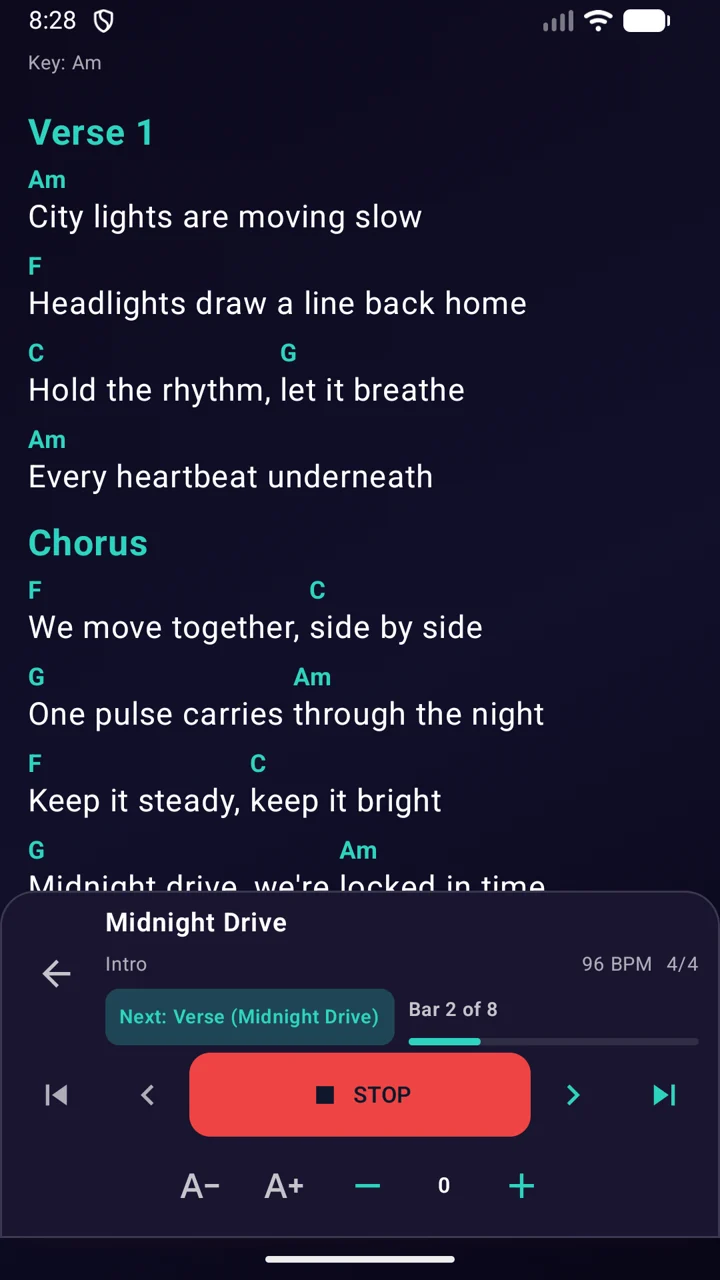
The chord-sheet view puts playback and section information alongside your music. With bar-based sections, optional ChordPro auto-scroll can follow the arrangement.
Reuse the songs you already prepared
Keep songs in your library, build another set and import or export CSV and Excel files. Start with a small rehearsal set and expand it when the flow feels right.
FAQ
Can I use my own chord sheets or sheet music?
Yes. Add text chord sheets in ChordPro style, PDFs or images. Text chords can be transposed; a PDF or photograph remains the document you attached.
Can I import a setlist I already have?
Yes. SyncPulse supports CSV and Excel setlist import and export. You can map spreadsheet columns during import. Check the imported song order, tempos and sections before playing.
Put it into practice
How to prepare a live setlist with tempos and chord sheets
Prepare an Android setlist for rehearsal or a gig: song tempos, sections, chord sheets, count-ins and transitions. Includes a practical rehearsal checklist.
Read the guideScreenshots on this page use the same language as the page.